FUJIFILM Logo
  • PRODUCTS
    PRODUCTS
    • Browse
      • Cameras
      • Lenses
      • Accessories
      • Software
      • Help Me Choose
    • By System
      • GFX Series
        • Cameras
        • Lenses
      • X Series
        • Cameras
        • Lenses
    • Group Items ( Link disabled )
      • Compare
        • Cameras
      • About Our Technology
        • Filmmaking
        • Film Simulation
        • X-Trans CMOS
    • B2B Customers
      • Digital Imaging Solution
      • IR Camera
      • Camera Control SDK
    GFX Series View all
    Cameras Mirrorless Digital Camera
    • GFX100 II
      GFX100 II
    • GFX100S II
      GFX100S II
    Fixed Lens Camera
    • GFX100RF
      GFX100RF
    Filmmaking Camera
    • GFX ETERNA 55
      GFX ETERNA 55
    GFX Series View all
    Lenses Prime
    • GF23mmF4 R LM WR
      GF23mmF4 R LM WR
    • GF30mmF3.5 R WR
      GF30mmF3.5 R WR
    • GF45mmF2.8 R WR
      GF45mmF2.8 R WR
    • GF50mmF3.5 R LM WR
      GF50mmF3.5 R LM WR
    • GF55mmF1.7 R WR
      GF55mmF1.7 R WR
    • GF63mmF2.8 R WR
      GF63mmF2.8 R WR
    • GF80mmF1.7 R WR
      GF80mmF1.7 R WR
    • GF110mmF2 R LM WR
      GF110mmF2 R LM WR
    • GF120mmF4 R LM OIS WR Macro
      GF120mmF4 R LM OIS WR Macro
    • GF250mmF4 R LM OIS WR
      GF250mmF4 R LM OIS WR
    • GF500mmF5.6 R LM OIS WR
      GF500mmF5.6 R LM OIS WR
    Zoom
    • GF20-35mmF4 R WR
      GF20-35mmF4 R WR
    • GF32-64mmF4 R LM WR
      GF32-64mmF4 R LM WR
    • GF32-90mmT3.5 PZ OIS WR
      GF32-90mmT3.5 PZ OIS WR
    • GF35-70mmF4.5-5.6 WR
      GF35-70mmF4.5-5.6 WR
    • GF45-100mmF4 R LM OIS WR
      GF45-100mmF4 R LM OIS WR
    • GF100-200mmF5.6 R LM OIS WR
      GF100-200mmF5.6 R LM OIS WR
    Tilt-Shift
    • GF30mmF5.6 T/S
      GF30mmF5.6 T/S
    • GF110mmF5.6 T/S Macro
      GF110mmF5.6 T/S Macro
    Teleconverter
    • GF1.4X TC WR
      GF1.4X TC WR
    X Series View all
    Cameras Mirrorless Digital Camera
    • X-H2S
      X-H2S
    • X-H2
      X-H2
    • X-Pro3
      X-Pro3
    • X-T5
      X-T5
    • X-S20
      X-S20
    • X-T50
      X-T50
    • X-T30 III
      X-T30 III
    • X-E5
      X-E5
    • X-M5
      X-M5
    Fixed Lens Camera
    • X100VI
      X100VI
    • X half
      X half
    X Series View all
    Lenses Prime
    • XF8mmF3.5 R WR
      XF8mmF3.5 R WR
    • XF14mmF2.8 R
      XF14mmF2.8 R
    • XF16mmF1.4 R WR
      XF16mmF1.4 R WR
    • XF16mmF2.8 R WR
      XF16mmF2.8 R WR
    • XF18mmF1.4 R LM WR
      XF18mmF1.4 R LM WR
    • XF18mmF2 R
      XF18mmF2 R
    • XF23mmF1.4 R LM WR
      XF23mmF1.4 R LM WR
    • XF23mmF2 R WR
      XF23mmF2 R WR
    • XF23mmF2.8 R WR
      XF23mmF2.8 R WR
    • XF27mmF2.8 R WR
      XF27mmF2.8 R WR
    • XF30mmF2.8 R LM WR Macro
      XF30mmF2.8 R LM WR Macro
    • XF33mmF1.4 R LM WR
      XF33mmF1.4 R LM WR
    • XF35mmF1.4 R
      XF35mmF1.4 R
    • XF35mmF2 R WR
      XF35mmF2 R WR
    • XF50mmF1.0 R WR
      XF50mmF1.0 R WR
    • XF50mmF2 R WR
      XF50mmF2 R WR
    • XF56mmF1.2 R WR
      XF56mmF1.2 R WR
    • XF60mmF2.4 R Macro
      XF60mmF2.4 R Macro
    • XF80mmF2.8 R LM OIS WR Macro
      XF80mmF2.8 R LM OIS WR Macro
    • XF90mmF2 R LM WR
      XF90mmF2 R LM WR
    • XF200mmF2 R LM OIS WR
      XF200mmF2 R LM OIS WR
    • XF500mmF5.6 R LM OIS WR
      XF500mmF5.6 R LM OIS WR
    • XC35mmF2
      XC35mmF2
    Zoom
    • XF8-16mmF2.8 R LM WR
      XF8-16mmF2.8 R LM WR
    • XF10-24mmF4 R OIS WR
      XF10-24mmF4 R OIS WR
    • XF16-50mmF2.8-4.8 R LM WR
      XF16-50mmF2.8-4.8 R LM WR
    • XF16-55mmF2.8 R LM WR II
      XF16-55mmF2.8 R LM WR II
    • XF16-80mmF4 R OIS WR
      XF16-80mmF4 R OIS WR
    • XF18-120mmF4 LM PZ WR
      XF18-120mmF4 LM PZ WR
    • XF18-135mmF3.5-5.6 R LM OIS WR
      XF18-135mmF3.5-5.6 R LM OIS WR
    • XF50-140mmF2.8 R LM OIS WR
      XF50-140mmF2.8 R LM OIS WR
    • XF55-200mmF3.5-4.8 R LM OIS
      XF55-200mmF3.5-4.8 R LM OIS
    • XF70-300mmF4-5.6 R LM OIS WR
      XF70-300mmF4-5.6 R LM OIS WR
    • XF100-400mmF4.5-5.6 R LM OIS WR
      XF100-400mmF4.5-5.6 R LM OIS WR
    • XF150-600mmF5.6-8 R LM OIS WR
      XF150-600mmF5.6-8 R LM OIS WR
    • XC13-33mmF3.5-6.3 OIS
      XC13-33mmF3.5-6.3 OIS
    • XC15-45mmF3.5-5.6 OIS PZ
      XC15-45mmF3.5-5.6 OIS PZ
    • XC50-230mmF4.5-6.7 OIS II
      XC50-230mmF4.5-6.7 OIS II
    Teleconverter
    • XF1.4X TC WR
      XF1.4X TC WR
    • XF2X TC WR
      XF2X TC WR
    Cine
    • MKX18-55mmT2.9
      MKX18-55mmT2.9
    • MKX50-135mmT2.9
      MKX50-135mmT2.9
  • Support
    SUPPORT
    • Downloads
      • Firmware
      • Software
      • LUT
      • Technical Data
    • Manuals
      • Cameras
      • Lenses
      • Accessories
      • Software
    • Compatibility
      • Cameras
      • Lenses
      • Accessories
      • Software
    • More Links
      • FAQ
      • FUJIFILM Service Centre
      • FUJIFILM X | GFX Members
      • FUJIFILM Professional Services (FPS)
  • News
  • Events
  • Promotions
  • Shop
  • X-Photographers
    • Galleries
    • Photographer
  • X Stories
    • X Stories
    • Learning Centre
©FUJIFILM Corporation.

Learning Centre

  • twitter
  • facebook
© David Kingham

> 4 minute read

Take Control with White Balance Presets

When automatic white balance doesn’t quite suit your needs, it’s time to take control with a white balance preset that better suits the conditions.

Different light sources have different colours – some look distinctly warm while others look cool or green. Our brains correct for this so efficiently, we often don’t notice these colour casts – but they are there, and we can certainly see them in our photographs.

Fortunately, X Series digital cameras correct for colour casts, too, using something called white balance. By applying some extra yellow or blue (known as colour temperature), or green or magenta (known as colour tint) pictures can be made to look like they were shot in completely neutral-looking daylight, whatever the actual conditions might have been.

© Tiffany Reed Briley

By default, white balance is set to automatic, and this works really well for the vast majority of situations. But there are circumstances where you want more creative control over the colour in your image – a sunset is a good example.

There aren’t many situations that confuse AWB, but when there’s a predominance of one colour in the frame, the system can think this is due to lighting conditions and then try to compensate for it. An example is when photographing among green foliage – if the leaves on the trees look a little brown, it’s because the AWB has added too much magenta.

© Seth K Hughes

Taking Control

The solution to AWB creativity is to take control of white balance yourself, and the easiest way to do this is with a preset. Your FUJIFILM camera has a number of white balance presets that are designed to match specific lighting conditions. You can access them through your camera’s Q Menu or a shortcut button (the right-hand four-way selector or touchscreen swipe are programmed like this by default).

Name Type of Light
Auto (AWB) Auto white balance
Daylight Shooting in full sunshine
Cloudy Shooting under cloudy skies
Shade Shooting in the shade of a building, or indoors using only window light
Flash Using built-in or external flash
Fluorescent Light from fluorescent strips or halogen spot lights
Tungsten Domestic electric lighting

These presets are designed to be quite general. If you don’t feel they match the scene you’re photographing, you can fine-tune them.

Access the White Balance menu with the shortcut button or touchscreen swipe (right, by default).

Scroll down to the preset that most closely matches the conditions you’re shooting, then scroll right to access the fine-tuning adjustment.

Moving up and down makes the chosen white balance more blue or more yellow (temperature). Moving left and right makes the chosen white balance more green or more magenta (tint). Press OK to set the new white balance.

RAW Files and White Balance Bracketing

In reality, you may not decide which white balance setting is ‘correct’ until you get home and look at your photographs on the screen of your computer. In fact, many people shoot RAW files so they can set white balance after shooting (this is one of the major advantages of working with RAW files – it’s easy to do in software like Adobe Photoshop).

Alternatively, why not try white balance bracketing to produce multiple files with different white balance settings?

  • Select bracketing shooting mode, either with your camera’s mode dial or in its drive menu.
  • Press MENU OK and scroll to the SHOOTING SETTING tab.
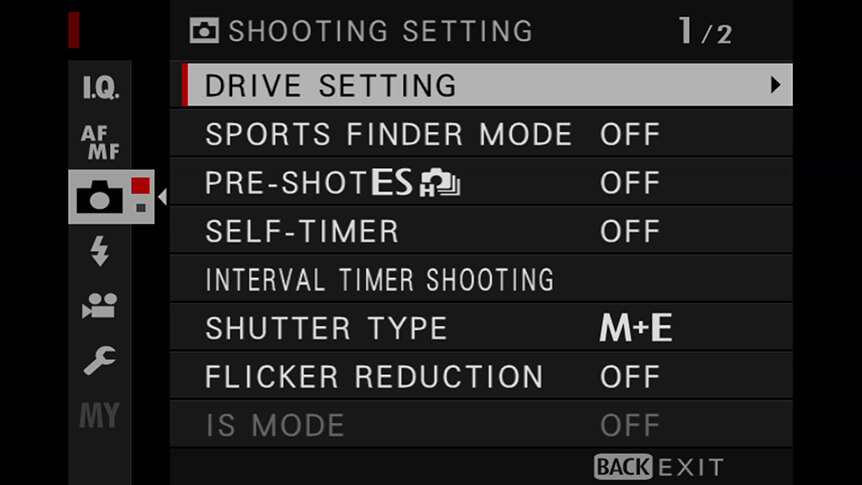
Choose DRIVE SETTING > BKT SETTING.

Select WHITE BALANCE BKT and choose an amount.

Each time the shutter is released, the camera takes one shot and processes it to create three copies: one at the current white balance setting, one with fine-tuning increased by the selected amount, and another with fine-tuning decreased by the selected amount.

Your Next Steps

  • CHALLENGE Get out with your camera and find as many different types of light as you can – sunshine, sunset, fluorescent strips, and electric lamps. Use the white balance presets on your X Series camera to capture different pictures in each location – which do you like the best? Post your results to social media with the hashtag #learnwithfujifilm. You can also submit your work here for a chance to be featured on our social media channels.

Also Try...

Using Negative Space

Which GFX Camera Body Is Right for You?

Specialised for different photographers’ needs, how do GFX bodies compare?

Three Ways to Improve Exposure on Moving Subjects

Discover some FUJIFILM X Series camera tricks to help you create great sports and action images

  • Products
    • Cameras
    • Lenses
    • Accessories
    • Software
    • Help Me Choose
  • Support
    • Download
    • Manual
    • Compatibility
    • FAQ
    • FUJIFILM X | GFX Members
    • FUJIFILM Professional Services (FPS)
    • Product Security Information
  • More
    • X-Photographers
    • X Stories
    • Learning Centre
    • Events
    • News
    • Promotions
    • Shop
Follow Us
  • UK
  • Global
FUJIFILM ©FUJIFILM Corporation.
  • Contact
  • Privacy Policy
  • Terms of Use
  • Cookie Settings
Select Your Country Or Region
  • America
    • pt-br

      Brazil

    • en-ca

      Canada

      • English
      • French
    • en-us

      USA

  • Asia Pacific
    • zh-cn

      China

    • en-in

      India

    • id-id

      Indonesia

    • ja-jp

      Japan

    • ko-kr

      Korea

    • en-my

      Malaysia

    • en-ph

      Philippines

    • en-sg

      Singapore

    • th-th

      Thailand

    • vi-vn

      Vietnam

  • Europe
    • de-at

      Austria

    • fr-be

      Belgium

      • Dutch
      • French
    • hr-hr

      Croatia

    • cs-cz

      Czechia

    • da-dk

      Denmark

    • et-ee

      Estonia

    • fi-fi

      Finland

    • fr-fr

      France

    • de-de

      Germany

    • el-gr

      Greece

    • hu-hu

      Hungary

    • is-is

      Iceland

    • en-ie

      Ireland

    • it-it

      Italy

    • lv-lv

      Latvia

    • lt-lt

      Lithuania

    • nl-nl

      Netherlands

    • no-no

      Norway

    • pl-pl

      Poland

    • pt-pt

      Portugal

    • ro-ro

      Romania

    • ru-ru

      Russia

    • sk-sk

      Slovakia

    • sl-si

      Slovenia

    • es-es

      Spain

    • sv-se

      Sweden

    • fr-ch

      Switzerland

      • French
      • German
    • tr-tr

      Turkey

    • en-gb

      UK

    • uk-ua

      Ukraine

  • Oceania
    • en-au

      Australia

    • en-nz

      New Zealand

  • Other
    • global

      Global

Stay in touch

Sign up to receive emails from FUJIFILM to be inspired by the world of X and GFX series and stay up-to-date with new product releases.

[ * ] Required fields