FUJIFILM Logo
  • PRODUCTS
    PRODUCTS
    • Browse
      • Cameras
      • Lenses
      • Accessories
      • Software
      • Help Me Choose
    • By System
      • GFX Series
        • Cameras
        • Lenses
      • X Series
        • Cameras
        • Lenses
    • Group Items ( Link disabled )
      • Compare
        • Cameras
      • About Our Technology
        • Filmmaking
        • Film Simulation
        • X-Trans CMOS
    • B2B Customers
      • Digital Imaging Solution
      • IR Camera
      • Camera Control SDK
    GFX Series View all
    Cameras Mirrorless Digital Camera
    • GFX100 II
      GFX100 II
    • GFX100S II
      GFX100S II
    Fixed Lens Camera
    • GFX100RF
      GFX100RF
    Filmmaking Camera
    • GFX ETERNA 55
      GFX ETERNA 55
    GFX Series View all
    Lenses Prime
    • GF23mmF4 R LM WR
      GF23mmF4 R LM WR
    • GF30mmF3.5 R WR
      GF30mmF3.5 R WR
    • GF45mmF2.8 R WR
      GF45mmF2.8 R WR
    • GF50mmF3.5 R LM WR
      GF50mmF3.5 R LM WR
    • GF55mmF1.7 R WR
      GF55mmF1.7 R WR
    • GF63mmF2.8 R WR
      GF63mmF2.8 R WR
    • GF80mmF1.7 R WR
      GF80mmF1.7 R WR
    • GF110mmF2 R LM WR
      GF110mmF2 R LM WR
    • GF120mmF4 R LM OIS WR Macro
      GF120mmF4 R LM OIS WR Macro
    • GF250mmF4 R LM OIS WR
      GF250mmF4 R LM OIS WR
    • GF500mmF5.6 R LM OIS WR
      GF500mmF5.6 R LM OIS WR
    Zoom
    • GF20-35mmF4 R WR
      GF20-35mmF4 R WR
    • GF32-64mmF4 R LM WR
      GF32-64mmF4 R LM WR
    • GF32-90mmT3.5 PZ OIS WR
      GF32-90mmT3.5 PZ OIS WR
    • GF35-70mmF4.5-5.6 WR
      GF35-70mmF4.5-5.6 WR
    • GF45-100mmF4 R LM OIS WR
      GF45-100mmF4 R LM OIS WR
    • GF100-200mmF5.6 R LM OIS WR
      GF100-200mmF5.6 R LM OIS WR
    Tilt-Shift
    • GF30mmF5.6 T/S
      GF30mmF5.6 T/S
    • GF110mmF5.6 T/S Macro
      GF110mmF5.6 T/S Macro
    Teleconverter
    • GF1.4X TC WR
      GF1.4X TC WR
    X Series View all
    Cameras Mirrorless Digital Camera
    • X-H2S
      X-H2S
    • X-H2
      X-H2
    • X-Pro3
      X-Pro3
    • X-T5
      X-T5
    • X-S20
      X-S20
    • X-T50
      X-T50
    • X-T30 III
      X-T30 III
    • X-E5
      X-E5
    • X-M5
      X-M5
    Fixed Lens Camera
    • X100VI
      X100VI
    • X half
      X half
    X Series View all
    Lenses Prime
    • XF8mmF3.5 R WR
      XF8mmF3.5 R WR
    • XF14mmF2.8 R
      XF14mmF2.8 R
    • XF16mmF1.4 R WR
      XF16mmF1.4 R WR
    • XF16mmF2.8 R WR
      XF16mmF2.8 R WR
    • XF18mmF1.4 R LM WR
      XF18mmF1.4 R LM WR
    • XF18mmF2 R
      XF18mmF2 R
    • XF23mmF1.4 R LM WR
      XF23mmF1.4 R LM WR
    • XF23mmF2 R WR
      XF23mmF2 R WR
    • XF23mmF2.8 R WR
      XF23mmF2.8 R WR
    • XF27mmF2.8 R WR
      XF27mmF2.8 R WR
    • XF30mmF2.8 R LM WR Macro
      XF30mmF2.8 R LM WR Macro
    • XF33mmF1.4 R LM WR
      XF33mmF1.4 R LM WR
    • XF35mmF1.4 R
      XF35mmF1.4 R
    • XF35mmF2 R WR
      XF35mmF2 R WR
    • XF50mmF1.0 R WR
      XF50mmF1.0 R WR
    • XF50mmF2 R WR
      XF50mmF2 R WR
    • XF56mmF1.2 R WR
      XF56mmF1.2 R WR
    • XF60mmF2.4 R Macro
      XF60mmF2.4 R Macro
    • XF80mmF2.8 R LM OIS WR Macro
      XF80mmF2.8 R LM OIS WR Macro
    • XF90mmF2 R LM WR
      XF90mmF2 R LM WR
    • XF200mmF2 R LM OIS WR
      XF200mmF2 R LM OIS WR
    • XF500mmF5.6 R LM OIS WR
      XF500mmF5.6 R LM OIS WR
    • XC35mmF2
      XC35mmF2
    Zoom
    • XF8-16mmF2.8 R LM WR
      XF8-16mmF2.8 R LM WR
    • XF10-24mmF4 R OIS WR
      XF10-24mmF4 R OIS WR
    • XF16-50mmF2.8-4.8 R LM WR
      XF16-50mmF2.8-4.8 R LM WR
    • XF16-55mmF2.8 R LM WR II
      XF16-55mmF2.8 R LM WR II
    • XF16-80mmF4 R OIS WR
      XF16-80mmF4 R OIS WR
    • XF18-120mmF4 LM PZ WR
      XF18-120mmF4 LM PZ WR
    • XF18-135mmF3.5-5.6 R LM OIS WR
      XF18-135mmF3.5-5.6 R LM OIS WR
    • XF50-140mmF2.8 R LM OIS WR
      XF50-140mmF2.8 R LM OIS WR
    • XF55-200mmF3.5-4.8 R LM OIS
      XF55-200mmF3.5-4.8 R LM OIS
    • XF70-300mmF4-5.6 R LM OIS WR
      XF70-300mmF4-5.6 R LM OIS WR
    • XF100-400mmF4.5-5.6 R LM OIS WR
      XF100-400mmF4.5-5.6 R LM OIS WR
    • XF150-600mmF5.6-8 R LM OIS WR
      XF150-600mmF5.6-8 R LM OIS WR
    • XC13-33mmF3.5-6.3 OIS
      XC13-33mmF3.5-6.3 OIS
    • XC15-45mmF3.5-5.6 OIS PZ
      XC15-45mmF3.5-5.6 OIS PZ
    • XC50-230mmF4.5-6.7 OIS II
      XC50-230mmF4.5-6.7 OIS II
    Teleconverter
    • XF1.4X TC WR
      XF1.4X TC WR
    • XF2X TC WR
      XF2X TC WR
    Cine
    • MKX18-55mmT2.9
      MKX18-55mmT2.9
    • MKX50-135mmT2.9
      MKX50-135mmT2.9
  • Support
    SUPPORT
    • Downloads
      • Firmware
      • Software
      • LUT
      • Technical Data
    • Manuals
      • Cameras
      • Lenses
      • Accessories
      • Software
    • Compatibility
      • Cameras
      • Lenses
      • Accessories
      • Software
    • More Links
      • FAQ
      • FUJIFILM Service Centre
      • FUJIFILM X | GFX Members
      • FUJIFILM Professional Services (FPS)
  • News
  • Events
  • Promotions
  • Shop
  • X-Photographers
    • Galleries
    • Photographer
  • X Stories
    • X Stories
    • Learning Centre
©FUJIFILM Corporation.

Learning Centre

  • twitter
  • facebook

> 4 minute read

Unlock Your Camera’s Extra Focusing Features

Your camera’s AF/MF Setting menu gives you a huge amount of control over its focusing system. Some options are down to personal preference, others suit specific styles of photography.

The AF/MF SETTING menu is one of the most feature-packed parts of any X Series camera. It’s full of options that control one of the most important aspects of photography and your selections can make the difference between biting critical sharpness or disappointing almost-there blur.

Let’s have a look at some of the features you might find here, which we haven’t discussed in other articles yet, and see what a difference they can make to your photography.

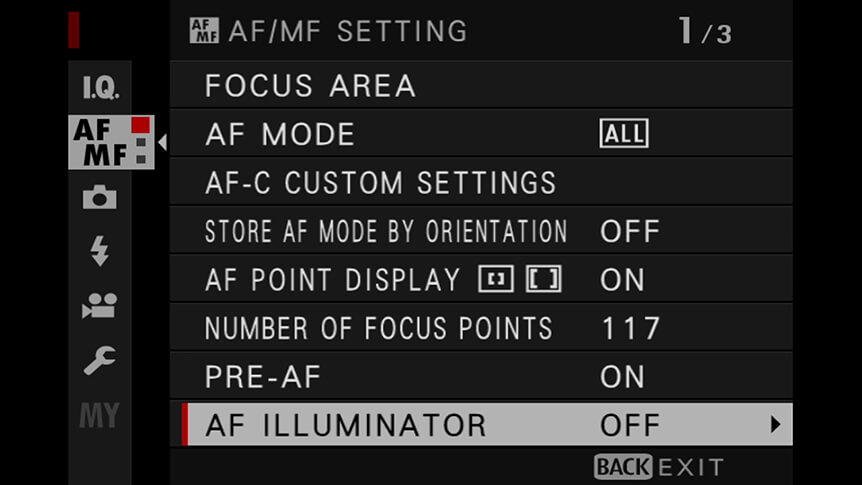
AF Point Display

Turn on this option by choosing YES or NO from AF/MF SETTING > AF POINT DISPLAY. When YES is selected, you’ll be able to see the inactive focus points, as well as the active ones (in green), when you’re shooting in Wide/Tracking or Zone AF mode.

Showing the inactive points can help to give you an idea of how well a subject is going to line up with the camera’s AF points. But if you find this a distraction, just turn it off by selecting NO.

Number of Focus Points

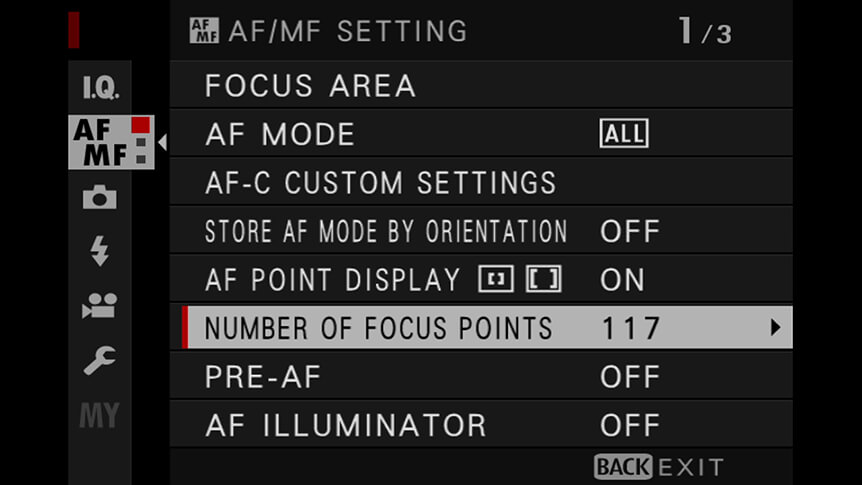
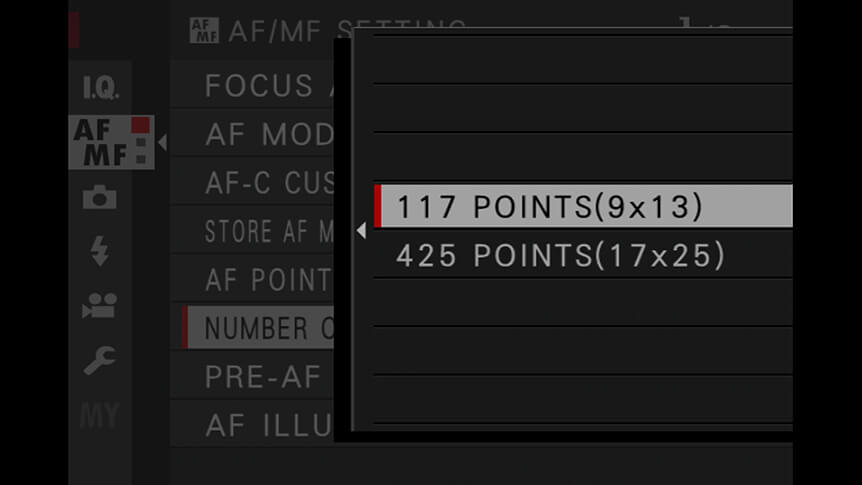
Although your X Series camera has lots of AF points, you don’t always have to have all of them active when you’re making images in Single Point AF mode. You might find that it can take too long to move between active AF points when you have the maximum number of points in operation. If moving AF point quickly is important to you, choose the smaller number of points from the AF/MF SETTING > NUMBER OF FOCUS POINTS menu.
Pre-AF

By default, this option is switched off and your camera will only start focusing when you half-press the shutter release button. But with Pre-AF switched on (AF/MF SETTING > PRE-AF > ON), the camera will focus continuously as long as it’s switched on, regardless of whether you have the shutter button pressed or not.
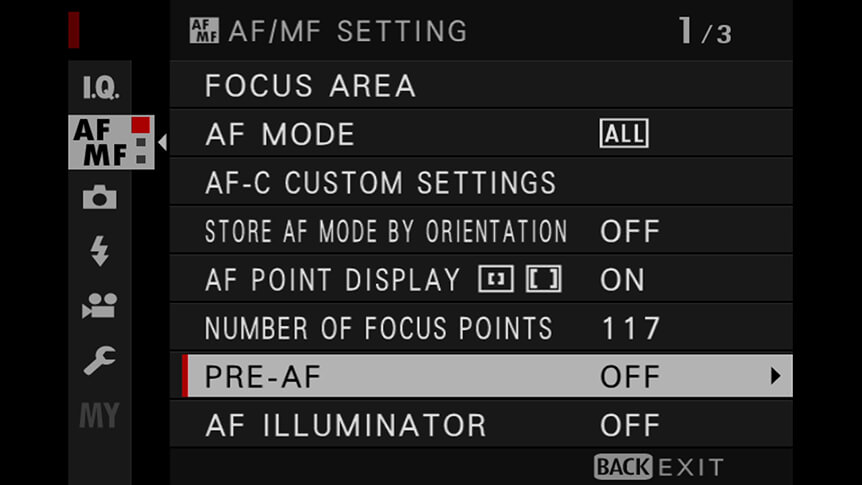
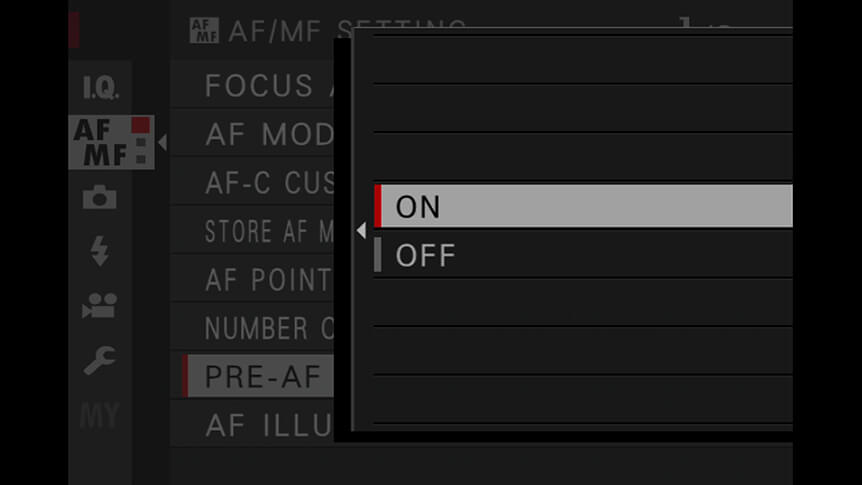
Why would you want to do this? Because with Pre-AF turned on, the lens will be nearer to where it needs to be when you press the shutter release button, which translates into faster acquisition of focus. It’s a good move for things like street photography, when you need to react quickly to unpredictable events.

Be warned though – all of that continuous focusing can use up a lot of battery power, so you might want to switch off Pre-AF when you don’t actually need it.

© Valerie Jardin

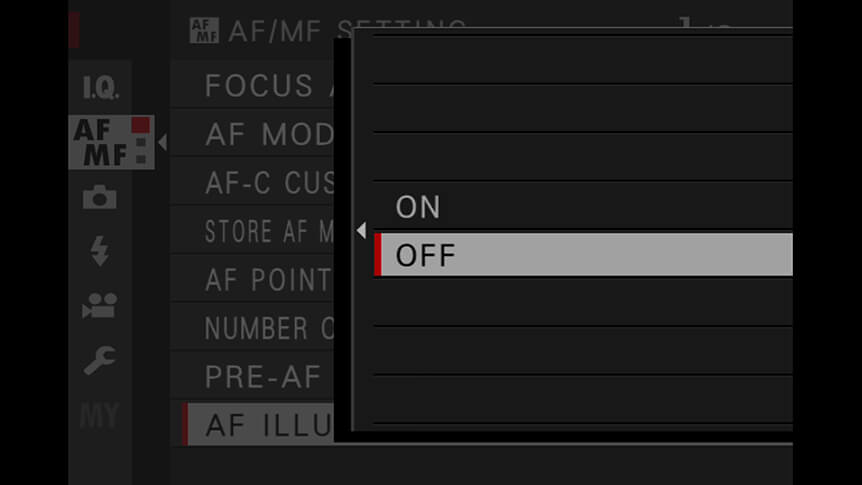
AF Illuminator

In dark conditions, the AF Illuminator sheds a little extra light on the scene to help the camera focus. It comes on automatically when it’s needed and can really make a difference when lighting conditions are on the edge of your camera’s limitations. Turn it off by choosing AF/MF SETTING > AF ILLUMINATOR > OFF. Why would you want to turn it off? Because it can sometimes give you away when you’re trying to be sneaky and make candid street photography without your subject realising.
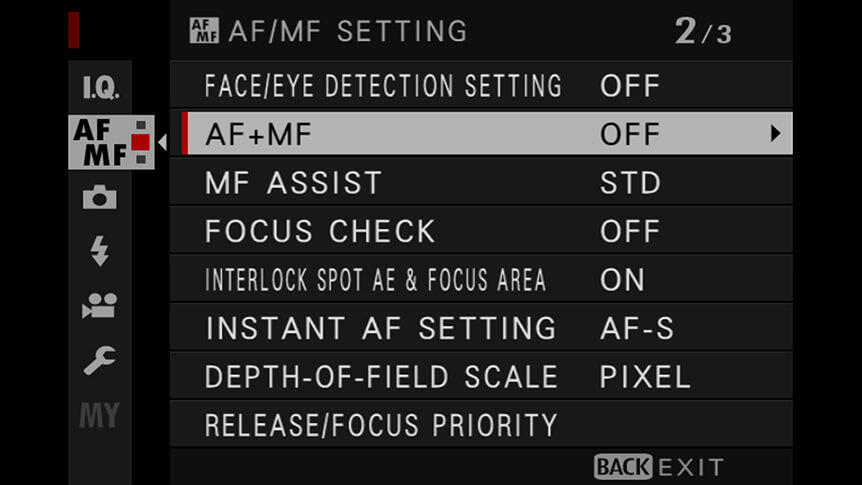
AF+MF

When this option is switched on (AF/MF SETTING > AF+MF > ON) in AF-S focus mode, focus can be adjusted manually by rotating the focus ring while the shutter button is half-pressed. Both standard and focus peaking MF assist options are supported.

This lets photographers tweak focus without interrupting their creative flow or switching into manual mode. This is a good one to leave switched on as it can be very useful.
Your Next Steps

  • CHALLENGE Switch on Pre-AF and go out on the street to capture some unpredictable moments. What’s the most spontaneous thing you can shoot? Post your favourite image to social media with the hashtags #learnwithfujifilm. You can also submit your work here for a chance to be featured on our social media channels.

Also Try...

Using Negative Space

Which GFX Camera Body Is Right for You?

Specialised for different photographers’ needs, how do GFX bodies compare?

Three Ways to Improve Exposure on Moving Subjects

Discover some FUJIFILM X Series camera tricks to help you create great sports and action images

  • Products
    • Cameras
    • Lenses
    • Accessories
    • Software
    • Help Me Choose
  • Support
    • Download
    • Manual
    • Compatibility
    • FAQ
    • FUJIFILM X | GFX Members
    • FUJIFILM Professional Services (FPS)
    • Product Security Information
  • More
    • X-Photographers
    • X Stories
    • Learning Centre
    • Events
    • News
    • Promotions
    • Shop
Follow Us
  • UK
  • Global
FUJIFILM ©FUJIFILM Corporation.
  • Contact
  • Privacy Policy
  • Terms of Use
  • Cookie Settings
Select Your Country Or Region
  • America
    • pt-br

      Brazil

    • en-ca

      Canada

      • English
      • French
    • en-us

      USA

  • Asia Pacific
    • zh-cn

      China

    • en-in

      India

    • id-id

      Indonesia

    • ja-jp

      Japan

    • ko-kr

      Korea

    • en-my

      Malaysia

    • en-ph

      Philippines

    • en-sg

      Singapore

    • th-th

      Thailand

    • vi-vn

      Vietnam

  • Europe
    • de-at

      Austria

    • fr-be

      Belgium

      • Dutch
      • French
    • hr-hr

      Croatia

    • cs-cz

      Czechia

    • da-dk

      Denmark

    • et-ee

      Estonia

    • fi-fi

      Finland

    • fr-fr

      France

    • de-de

      Germany

    • el-gr

      Greece

    • hu-hu

      Hungary

    • is-is

      Iceland

    • en-ie

      Ireland

    • it-it

      Italy

    • lv-lv

      Latvia

    • lt-lt

      Lithuania

    • nl-nl

      Netherlands

    • no-no

      Norway

    • pl-pl

      Poland

    • pt-pt

      Portugal

    • ro-ro

      Romania

    • ru-ru

      Russia

    • sk-sk

      Slovakia

    • sl-si

      Slovenia

    • es-es

      Spain

    • sv-se

      Sweden

    • fr-ch

      Switzerland

      • French
      • German
    • tr-tr

      Turkey

    • en-gb

      UK

    • uk-ua

      Ukraine

  • Oceania
    • en-au

      Australia

    • en-nz

      New Zealand

  • Other
    • global

      Global

Stay in touch

Sign up to receive emails from FUJIFILM to be inspired by the world of X and GFX series and stay up-to-date with new product releases.

[ * ] Required fields








