FUJIFILM Logo
  • PRODUCTS
    PRODUCTS
    • Browse
      • Cameras
      • Lenses
      • Accessories
      • Software
      • Help Me Choose
    • By System
      • GFX Series
        • Cameras
        • Lenses
      • X Series
        • Cameras
        • Lenses
    • Group Items ( Link disabled )
      • Compare
        • Cameras
      • About Our Technology
        • Filmmaking
        • Film Simulation
        • X-Trans CMOS
    • B2B Customers
      • Digital Imaging Solution
      • IR Camera
      • Camera Control SDK
    GFX Series View all
    Cameras Mirrorless Digital Camera
    • GFX100 II
      GFX100 II
    • GFX100S II
      GFX100S II
    Fixed Lens Camera
    • GFX100RF
      GFX100RF
    Filmmaking Camera
    • GFX ETERNA 55
      GFX ETERNA 55
    GFX Series View all
    Lenses Prime
    • GF23mmF4 R LM WR
      GF23mmF4 R LM WR
    • GF30mmF3.5 R WR
      GF30mmF3.5 R WR
    • GF45mmF2.8 R WR
      GF45mmF2.8 R WR
    • GF50mmF3.5 R LM WR
      GF50mmF3.5 R LM WR
    • GF55mmF1.7 R WR
      GF55mmF1.7 R WR
    • GF63mmF2.8 R WR
      GF63mmF2.8 R WR
    • GF80mmF1.7 R WR
      GF80mmF1.7 R WR
    • GF110mmF2 R LM WR
      GF110mmF2 R LM WR
    • GF120mmF4 R LM OIS WR Macro
      GF120mmF4 R LM OIS WR Macro
    • GF250mmF4 R LM OIS WR
      GF250mmF4 R LM OIS WR
    • GF500mmF5.6 R LM OIS WR
      GF500mmF5.6 R LM OIS WR
    Zoom
    • GF20-35mmF4 R WR
      GF20-35mmF4 R WR
    • GF32-64mmF4 R LM WR
      GF32-64mmF4 R LM WR
    • GF32-90mmT3.5 PZ OIS WR
      GF32-90mmT3.5 PZ OIS WR
    • GF35-70mmF4.5-5.6 WR
      GF35-70mmF4.5-5.6 WR
    • GF45-100mmF4 R LM OIS WR
      GF45-100mmF4 R LM OIS WR
    • GF100-200mmF5.6 R LM OIS WR
      GF100-200mmF5.6 R LM OIS WR
    Tilt-Shift
    • GF30mmF5.6 T/S
      GF30mmF5.6 T/S
    • GF110mmF5.6 T/S Macro
      GF110mmF5.6 T/S Macro
    Teleconverter
    • GF1.4X TC WR
      GF1.4X TC WR
    X Series View all
    Cameras Mirrorless Digital Camera
    • X-H2S
      X-H2S
    • X-H2
      X-H2
    • X-Pro3
      X-Pro3
    • X-T5
      X-T5
    • X-S20
      X-S20
    • X-T50
      X-T50
    • X-T30 III
      X-T30 III
    • X-E5
      X-E5
    • X-M5
      X-M5
    Fixed Lens Camera
    • X100VI
      X100VI
    • X half
      X half
    X Series View all
    Lenses Prime
    • XF8mmF3.5 R WR
      XF8mmF3.5 R WR
    • XF14mmF2.8 R
      XF14mmF2.8 R
    • XF16mmF1.4 R WR
      XF16mmF1.4 R WR
    • XF16mmF2.8 R WR
      XF16mmF2.8 R WR
    • XF18mmF1.4 R LM WR
      XF18mmF1.4 R LM WR
    • XF18mmF2 R
      XF18mmF2 R
    • XF23mmF1.4 R LM WR
      XF23mmF1.4 R LM WR
    • XF23mmF2 R WR
      XF23mmF2 R WR
    • XF23mmF2.8 R WR
      XF23mmF2.8 R WR
    • XF27mmF2.8 R WR
      XF27mmF2.8 R WR
    • XF30mmF2.8 R LM WR Macro
      XF30mmF2.8 R LM WR Macro
    • XF33mmF1.4 R LM WR
      XF33mmF1.4 R LM WR
    • XF35mmF1.4 R
      XF35mmF1.4 R
    • XF35mmF2 R WR
      XF35mmF2 R WR
    • XF50mmF1.0 R WR
      XF50mmF1.0 R WR
    • XF50mmF2 R WR
      XF50mmF2 R WR
    • XF56mmF1.2 R WR
      XF56mmF1.2 R WR
    • XF60mmF2.4 R Macro
      XF60mmF2.4 R Macro
    • XF80mmF2.8 R LM OIS WR Macro
      XF80mmF2.8 R LM OIS WR Macro
    • XF90mmF2 R LM WR
      XF90mmF2 R LM WR
    • XF200mmF2 R LM OIS WR
      XF200mmF2 R LM OIS WR
    • XF500mmF5.6 R LM OIS WR
      XF500mmF5.6 R LM OIS WR
    • XC35mmF2
      XC35mmF2
    Zoom
    • XF8-16mmF2.8 R LM WR
      XF8-16mmF2.8 R LM WR
    • XF10-24mmF4 R OIS WR
      XF10-24mmF4 R OIS WR
    • XF16-50mmF2.8-4.8 R LM WR
      XF16-50mmF2.8-4.8 R LM WR
    • XF16-55mmF2.8 R LM WR II
      XF16-55mmF2.8 R LM WR II
    • XF16-80mmF4 R OIS WR
      XF16-80mmF4 R OIS WR
    • XF18-120mmF4 LM PZ WR
      XF18-120mmF4 LM PZ WR
    • XF18-135mmF3.5-5.6 R LM OIS WR
      XF18-135mmF3.5-5.6 R LM OIS WR
    • XF50-140mmF2.8 R LM OIS WR
      XF50-140mmF2.8 R LM OIS WR
    • XF55-200mmF3.5-4.8 R LM OIS
      XF55-200mmF3.5-4.8 R LM OIS
    • XF70-300mmF4-5.6 R LM OIS WR
      XF70-300mmF4-5.6 R LM OIS WR
    • XF100-400mmF4.5-5.6 R LM OIS WR
      XF100-400mmF4.5-5.6 R LM OIS WR
    • XF150-600mmF5.6-8 R LM OIS WR
      XF150-600mmF5.6-8 R LM OIS WR
    • XC13-33mmF3.5-6.3 OIS
      XC13-33mmF3.5-6.3 OIS
    • XC15-45mmF3.5-5.6 OIS PZ
      XC15-45mmF3.5-5.6 OIS PZ
    • XC50-230mmF4.5-6.7 OIS II
      XC50-230mmF4.5-6.7 OIS II
    Teleconverter
    • XF1.4X TC WR
      XF1.4X TC WR
    • XF2X TC WR
      XF2X TC WR
    Cine
    • MKX18-55mmT2.9
      MKX18-55mmT2.9
    • MKX50-135mmT2.9
      MKX50-135mmT2.9
  • Support
    SUPPORT
    • Downloads
      • Firmware
      • Software
      • LUT
      • Technical Data
    • Manuals
      • Cameras
      • Lenses
      • Accessories
      • Software
    • Compatibility
      • Cameras
      • Lenses
      • Accessories
      • Software
    • More Links
      • FAQ
      • FUJIFILM Service Centre
      • FUJIFILM X | GFX Members
      • FUJIFILM Professional Services (FPS)
  • News
  • Events
  • Promotions
  • Shop
  • X-Photographers
    • Galleries
    • Photographer
  • X Stories
    • X Stories
    • Learning Centre
©FUJIFILM Corporation.

Learning Centre

  • twitter
  • facebook
© Alison Conklin

> 3 minute read

Monitoring Audio in Your Movies

Take the guesswork out of audio by visualising and monitoring the sound your camera is recording as you go along.

When it comes to making great video, moving images are only part of the picture. A high-quality soundtrack is essential if your footage is going to have a professional look and feel. This means taking manual control of things like recording levels and using an external microphone, connected through your camera’s 2.5mm or 3.5mm socket.

But how are you to know if the audio being recorded is any good? Rather than discover too late that your soundtrack is too quiet, too echoey, or distorted, it’s possible to monitor sound as you are filming, so there are no nasty surprises later on.

Woman sat on wall filming with FUJIFILM X-S10

On the Level

The best and clearest indication of whether sound is being recorded well comes from the sound level meter displayed on screen when you’re recording video. You’ll see these two bars (one for the left channel, the other for the right) moving up and down to match the fluctuating volume of the ambient audio.

FUJIFILM camera recording tree-lined path

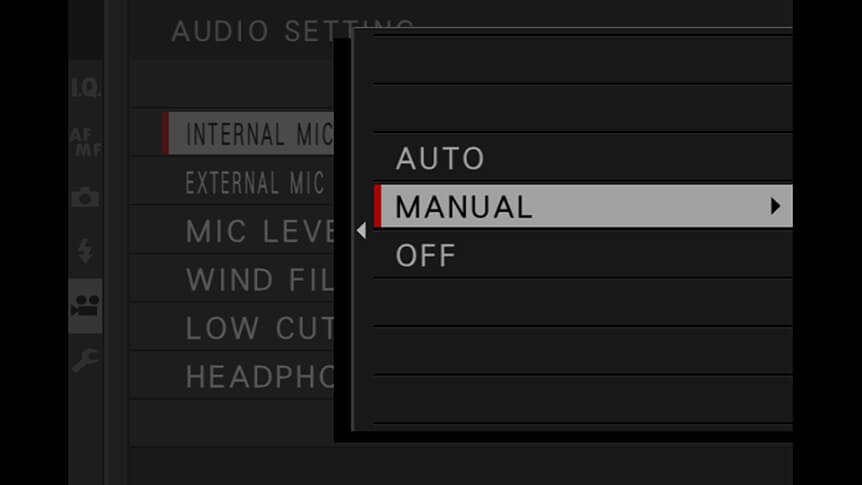
The trick is to fine-tune the camera’s Microphone Level Adjustment (MOVIE SETTING, then AUDIO SETTING > INTERNAL MIC LEVEL ADJUSTMENT) while watching these bars. Try to get them averaging at the line two-thirds of the way up, and only occasionally going into the yellow section at the top.

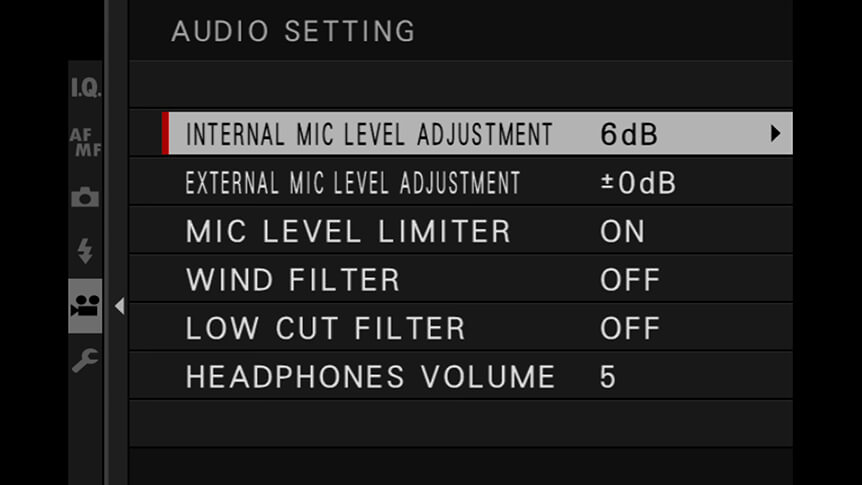
You can assign a custom function button to INTERNAL/EXTERNAL MIC LEVEL ADJUSTMENT for convenient readjustment as you go along.

Using An External Mic

The same controls can be used when you’re using an external microphone, such a shotgun or lav mic. In this instance, go through the same Movie Setting menu and then select EXTERNAL MIC LEVEL ADJUSTMENT > MANUAL.

Of course, if you want to record both ambient sounds using your camera’s internal microphone, plus a voice track of someone talking to the camera, this can’t be done in-camera, as it’s not possible to record two separate audio tracks. In these instances, you should record the ambient sounds in-camera and then have the external microphone recording to a separate sound recorder. In such instances, a lavalier (or lav) mic connected to the recording device is recommended. The beauty of this setup is that the both mic and recording device can be hidden on the person talking to the camera, which affords a greater level of freedom rather than being tethered by a cable connecting to the camera.

Naturally, the camera’s microphone is likely to still pick up some of the speech, so you need to ensure the audio tracks are correctly synced together. The simplest way to do this is to ensure the person on camera claps their hands before recording, as the peak on the audio track will be easy to spot when editing the footage.

Getting Plugged In

The sound level meter is great for assessing the volume of recorded audio, but it won’t tell you about other potential problems – like wind noise or echo. For this, you need to listen live to what is being recorded.

Many X Series cameras feature a 3.5mm headphone socket just for this purpose or can be adapted with a USB-C headphone adapter. By connecting headphones, you’ll be able to monitor audio live and listen for any potential problems.

Man in blue jacket filming with FUJIFILM camera

Any regular pair of headphones will work well for this, although over-ear types that exclude background noise will help you discern what’s being recorded by the camera and what is just ambient noise.

Your Next Steps

  • CHALLENGE Record an interview with a friend or family member using an off-camera microphone and manual recording levels. Monitor the audio you’re picking up using headphones and move the mic about to get the best quality sound you can. Post your clips to social media with the hashtags #learnwithfujifilm and #video. You can also submit your work here for a chance to be featured on our social media channels.

Also Try...

Using Negative Space

Which GFX Camera Body Is Right for You?

Specialised for different photographers’ needs, how do GFX bodies compare?

Three Ways to Improve Exposure on Moving Subjects

Discover some FUJIFILM X Series camera tricks to help you create great sports and action images

  • Products
    • Cameras
    • Lenses
    • Accessories
    • Software
    • Help Me Choose
  • Support
    • Download
    • Manual
    • Compatibility
    • FAQ
    • FUJIFILM X | GFX Members
    • FUJIFILM Professional Services (FPS)
    • Product Security Information
  • More
    • X-Photographers
    • X Stories
    • Learning Centre
    • Events
    • News
    • Promotions
    • Shop
Follow Us
  • UK
  • Global
FUJIFILM ©FUJIFILM Corporation.
  • Contact
  • Privacy Policy
  • Terms of Use
  • Cookie Settings
Select Your Country Or Region
  • America
    • pt-br

      Brazil

    • en-ca

      Canada

      • English
      • French
    • en-us

      USA

  • Asia Pacific
    • zh-cn

      China

    • en-in

      India

    • id-id

      Indonesia

    • ja-jp

      Japan

    • ko-kr

      Korea

    • en-my

      Malaysia

    • en-ph

      Philippines

    • en-sg

      Singapore

    • th-th

      Thailand

    • vi-vn

      Vietnam

  • Europe
    • de-at

      Austria

    • fr-be

      Belgium

      • Dutch
      • French
    • hr-hr

      Croatia

    • cs-cz

      Czechia

    • da-dk

      Denmark

    • et-ee

      Estonia

    • fi-fi

      Finland

    • fr-fr

      France

    • de-de

      Germany

    • el-gr

      Greece

    • hu-hu

      Hungary

    • is-is

      Iceland

    • en-ie

      Ireland

    • it-it

      Italy

    • lv-lv

      Latvia

    • lt-lt

      Lithuania

    • nl-nl

      Netherlands

    • no-no

      Norway

    • pl-pl

      Poland

    • pt-pt

      Portugal

    • ro-ro

      Romania

    • ru-ru

      Russia

    • sk-sk

      Slovakia

    • sl-si

      Slovenia

    • es-es

      Spain

    • sv-se

      Sweden

    • fr-ch

      Switzerland

      • French
      • German
    • tr-tr

      Turkey

    • en-gb

      UK

    • uk-ua

      Ukraine

  • Oceania
    • en-au

      Australia

    • en-nz

      New Zealand

  • Other
    • global

      Global

Stay in touch

Sign up to receive emails from FUJIFILM to be inspired by the world of X and GFX series and stay up-to-date with new product releases.

[ * ] Required fields